---
title: "eMaint Pricing vs FixAhead — CMMS Comparison"
description: "eMaint pricing beside FixAhead's: eMaint fits calibrated and regulated teams on a prepaid annual contract; FixAhead fits teams that want to start free and see the price."
---
# eMaint or FixAhead: CMMS every technician uses
eMaint sets a user minimum on a prepaid annual commitment. On FixAhead, $99 a month covers 100 assets and every user.
[Start free](https://app.fixahead.com/signup)
- Free plan, no card. Or [book a demo](https://savvycal.com/fixahead/30-minutes-demo).
## Which one fits your team
eMaint fits calibration, validation, or regulated maintenance, and a team that wants a dedicated account manager. FixAhead fits a team that wants to start free and pay by the month, with spare parts and checklists in one plan and no contract.
## FixAhead beside eMaint
| | FixAhead | eMaint |
| --- | --- | --- |
| How you're billed | Users or assets | 3 or 5 user minimum |
| Commitment | Cancel anytime | Prepaid annual |
| Free plan | 2 users or 50 assets | None on its pricing page |
| Public pricing | Yes | Book a demo |
| Parts and inventory | Stock and reorder alerts | Professional |
| Procedures and checklists | A photo required per task | Professional |
| Offline on the phone | Android, every plan | Professional |
| Import | Assets and procedures | Data Importing |
| Multiple sites | Location tree, any depth | Enterprise |
Source: [emaint.com/pricing](https://www.emaint.com/pricing/)
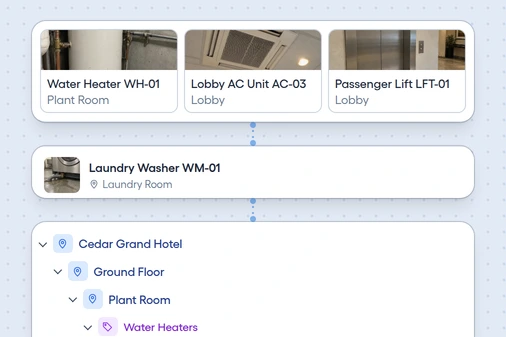
## Every site in one location tree
Place every asset in its location, as deep as you need, and filter the dashboard to the room or area you're checking.
- **Levels.** Building, floor, room, and zone.
- **Full path.** Dropdowns show the whole path.
- **Location report.** See how many work orders each place had.
## What to check on the eMaint side
What your team would pay
eMaint shows Book a demo in place of a price. Its prices hold for the term and may change at renewal.
How your requesters report
eMaint lists three ways to submit work requests, among them requestor logins, so check which your plan includes.
What Enterprise adds
eMaint lists global multi-site operations, single sign-on, pre-built ERP connectors, and API access there.
## Where eMaint is ahead
eMaint's Professional plan includes calibrations, calibration labels, and tracking of standards and tools. It integrates Fluke condition monitoring, names GxP and 21 CFR Part 11 work, and gives Professional customers a dedicated Customer Success Manager.
## Move your assets from eMaint
Send us the file, and our support team loads it free. Or upload a CSV or Excel file up to 10 MB, and see each row's errors before anything loads.
- Match your file to the [asset template's columns](/templates/asset-register/)
- Create the locations and categories it names
- Upload it, and fix any flagged row
- [See what FixAhead connects to](/integrations/)
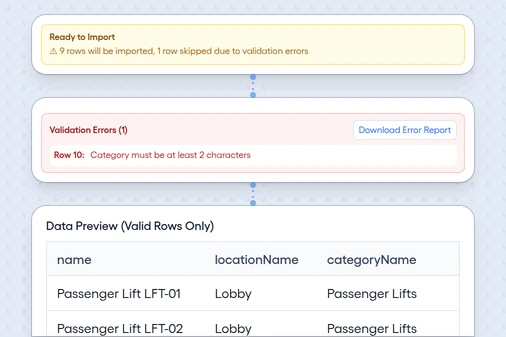
*Bulk import, with a flagged row*
## Questions before you switch
Is there a contract to leave?
FixAhead has none. Cancel anytime.
Can I take my data out again?
Yes. Export to CSV or Excel at any time, after cancelling too.