---
title: "Fiix Pricing vs FixAhead — CMMS Comparison"
description: "Fiix pricing beside FixAhead's: Fiix fits multi-site and industrial teams that need connections to ERP, MES, or SCADA systems; FixAhead fits teams that want the price on the page."
---
# Fiix or FixAhead: CMMS every technician uses
Fiix prices each user on Basic and Professional. On FixAhead, $99 a month covers 100 assets and every user.
[Start free](https://app.fixahead.com/signup)
- Free plan, no card. Or [book a demo](https://savvycal.com/fixahead/30-minutes-demo).
## Which one fits your team
Fiix fits a team whose industrial equipment needs ERP, MES, or SCADA connections. FixAhead fits a team with several sites that wants them all in one location tree, with no higher tier to buy.
## What a team of 10 pays
| Plan | | Cost for 10 users ($ a month) |
| --- | --- | --- |
| Fiix Basic | 450 |
| Fiix Professional | 750 |
| FixAhead, billed annually | 66 |
| FixAhead, billed monthly | 99 |
Fiix per user a month: Basic $45, Professional $75. Its page shows no annual price.
FixAhead's $99 a month covers 10 users with unlimited assets, or 100 assets with unlimited users, on the same terms at 50 users or more.
## FixAhead beside Fiix
| | FixAhead | Fiix |
| --- | --- | --- |
| How you're billed | Users or assets | Per user, Enterprise custom |
| Free plan | 2 users or 50 assets | Free, limited users |
| Public pricing | Yes | Except Enterprise |
| PM schedules | Calendar or hour meter | 25 active on Free, unlimited from Basic |
| Parts and inventory | Stock and reorder alerts | Every plan |
| Procedures and checklists | A photo required per task | Task lists, pass/fail from Basic |
| Import | Assets and procedures | Assets and work orders, by CSV |
| Multiple sites | Location tree, any depth | Professional |
FixAhead's Android app works offline for assigned work orders, and the work syncs when the connection returns.
Sources: [fiixsoftware.com/cmms/pricing](https://fiixsoftware.com/cmms/pricing/) · [fiixsoftware.com/free-cmms](https://fiixsoftware.com/free-cmms/)
## Every site in one location tree
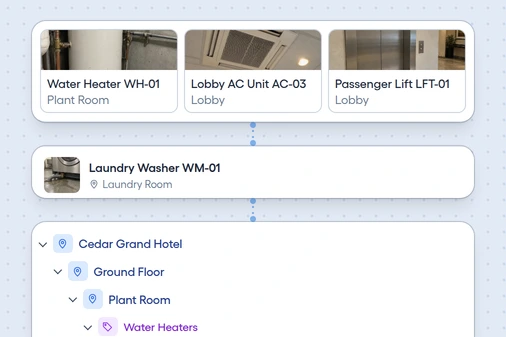
Place every asset in its location, as deep as you need, and filter the dashboard to the room or area you're checking.
- **Levels.** Building, floor, room, and zone.
- **Full path.** Dropdowns show the whole path.
- **Location report.** See how many work orders each place had.
## What to check on the Fiix side
Who counts as a user
Fiix counts any named person who logs in, so count them before you price Basic or Professional.
Which plan holds what you need
Professional adds multi-site management, nested PMs, and custom reports. Enterprise adds e-signatures, an audit trail, and failure codes.
What setup and support include
Fiix asks you to contact it for implementation packages. Standard support runs 9am to 5pm EST (US Eastern time), with responses in 12 hours or less.
## Where Fiix is ahead
Fiix syncs two ways with popular ERP systems, and connects to MES, DCS, and SCADA systems. Its Enterprise plan adds an Integration Hub, at additional cost.
## Move your assets from Fiix
Send us the file, and our support team loads it free. Or upload a CSV or Excel file up to 10 MB, and see each row's errors before anything loads.
- Match your file to the [asset template's columns](/templates/asset-register/)
- Create the locations and categories it names
- Upload it, and fix any flagged row
- [See what FixAhead connects to](/integrations/)
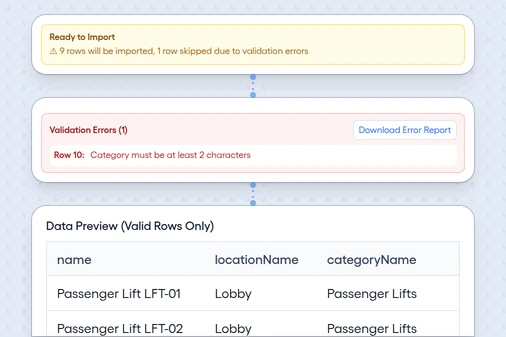
*Bulk import, with a flagged row*
## Questions before you switch
Is there a contract to leave?
FixAhead has none. Cancel anytime.
Can I take my data out again?
Yes. Export to CSV or Excel at any time, after cancelling too.