---
title: "Maintenance Spreadsheet vs CMMS: Move From Excel Free — FixAhead"
description: "Maintenance spreadsheet or CMMS: see each job in Excel beside FixAhead, where every PM makes its own work order. We load your sheet free."
---
# Move from Excel to CMMS software for free
Fill the asset template from your spreadsheet, or send us the file and our support team loads it for you.
[Start free](https://app.fixahead.com/signup)
- Free plan, no card. Or [book a demo](https://savvycal.com/fixahead/30-minutes-demo).
## When a spreadsheet still fits
A spreadsheet holds a short PM list one person keeps. With a second technician, a second location, or a preventive schedule, FixAhead makes each PM's work order and records who did each job.
## Each job in a spreadsheet and in FixAhead
| | FixAhead | Spreadsheets |
| --- | --- | --- |
| PM work orders | Made before they're due | You make each one |
| Work order status | Tracked through each status | A cell you update |
| Reliability figures | MTBF and MTTR | Your own formulas |
| Reporting an issue | QR code, no account | Whoever has the file |
| Parts and inventory | Stock and reorder alerts | A list you keep |
| Multiple locations | Location tree, any depth | Your own columns |
| Phone | Android app, with or without signal | A shared file |
| Push notifications | On each assignment | None |
| Technician assignment | Matched by skill | You choose each one |
| User roles | Four, each with its own permissions | Whoever has the file |
| Import and export | CSV and Excel, each row checked | CSV and Excel |
## Preventive maintenance makes its own work orders
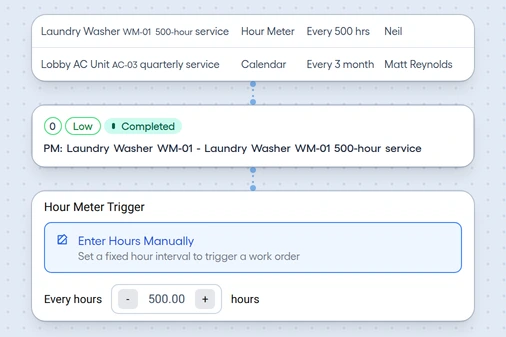
Set each PM by calendar or hour meter, and its work order arrives before it's due, with its checklist.
[See preventive maintenance](/features/preventive-maintenance/)
## Every request in one queue
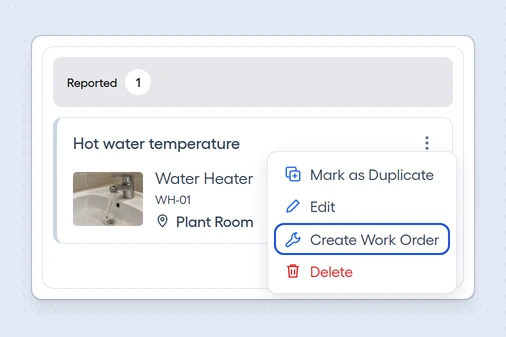
Whoever scans a QR code reports with a photo and no account. You turn each report into a work order from its card's menu.
[See issue tracking](/features/issue-tracking/)
## See who did each job, and when
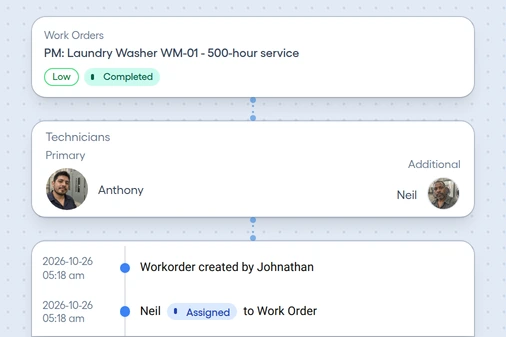
Each work order records who created it, who was assigned, and each status change, with its date and time.
[See work orders](/features/work-orders/)
## Technicians log work at the job
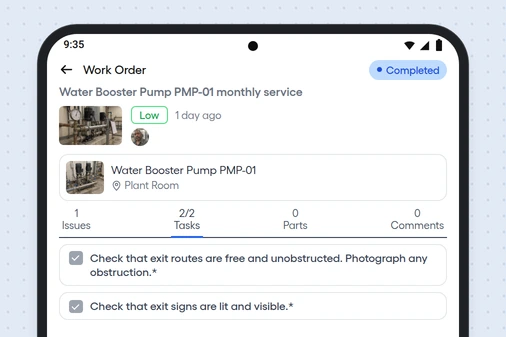
They open assigned work orders on Android, follow the checklist, and add photos, and the work syncs once the connection's back.
[See the Android app](/features/mobile-app/)
## See which assets fail, and what they cost
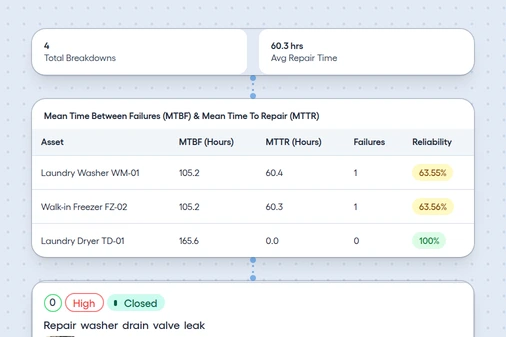
The 11 report types show MTBF, MTTR, PM compliance, cost, and each technician's workload.
[See the reports](/features/reporting/)
## Know when spare parts run low
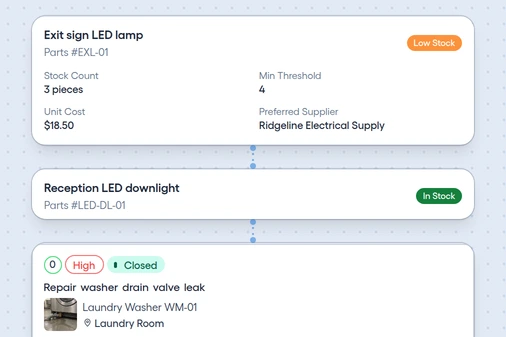
Each part gets a Low Stock alert at its minimum, and each work order shows the parts it used.
[See inventory](/features/inventory/)
## Move your assets from your spreadsheet
Upload a CSV or Excel file up to 10 MB, and you see each row's errors before anything loads.
- Match your file to the [asset template's columns](/templates/asset-register/)
- Create the locations and categories it names
- Upload it, and fix any flagged row
- [See what FixAhead connects to](/integrations/)
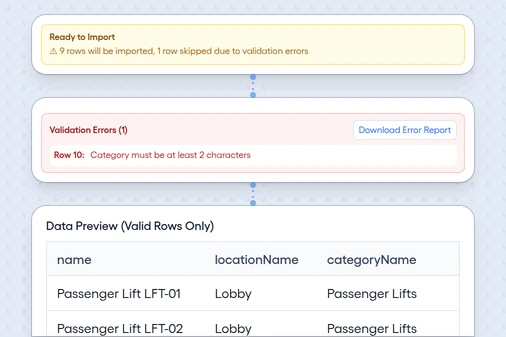
*Bulk import, with a flagged row*
## Questions about moving off Excel
How steep is the learning curve compared to spreadsheets?
The interface is designed for maintenance professionals, not IT specialists. Work orders, assets, and PM schedules follow intuitive workflows, with no formulas or macros required.
Is it worth it for a small team?
Start free with 2 users or 50 assets, with unlimited work orders and no time limit.
Can I still export to Excel?
Yes. Export every list to Excel, and each report to Excel, CSV, or PDF.
How does it compare with Google Sheets or Airtable?
They're general tools. FixAhead comes with PM schedules, work orders, reliability reports, and QR reporting, with nothing to build.
## Compare another kind of tool
- ### vs legacy CMMS
Bring your asset list in by template, with each row checked before anything loads. [Open the comparison](/compare/legacy-cmms/)
- ### vs enterprise suites
One plan with its price on the page, for teams that don't need a suite. [Open the comparison](/compare/enterprise/)