
CMMS software: nothing falls through the cracks
Every request goes into one queue for your whole team, and when you pay by assets, users have no limit.
- Free plan, no card.

Walk-in Freezer FZ-02
Main
Kitchen

Freezer door not sealing

Replace walk-in freezer door gasket
ClosedMatt Reynolds
Walk-in freezer door gasket1/1
Matt Reynolds
Assigned WO-ID: 5
Walk-in freezer door gasket
1Low Stock
1 PM Due Next Week
Open Work Orders
5of 12 work orders
Work Orders This Week
- Mon
- Tue
- Wed
- Thu
- Fri
How it works
Every request becomes a work order in a guided wizard that takes under a minute, and your technician closes it on the phone at the job.
Step 1
Anyone reports from a QR code
Nobody on the floor needs an account or an app, and each report reaches you with its photo, asset, and location.
Step 2
You turn it into a work order
Pick the asset, the due date, and the technician, and it's assigned.
Step 3
Your technician does it at the job, even offline
They open it on Android, follow the checklist, add the photo a task requires, and log the parts they used.
PM work orders arrive before they're due
Set each PM by calendar or hour meter, and it no longer lives in someone's head.

Every asset's history, ready when an audit asks
Send us your asset spreadsheet, and we load it free. From then on, each job stays on the asset's record, beside its PM compliance.

CMMS software for your trade's maintenance work
 See how it works
Manufacturing
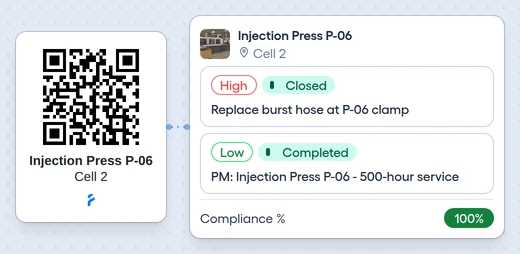
An operator reports a stopped machine by QR code, and its PM evidence and breakdown history stay on the asset.
 See how it works
Healthcare
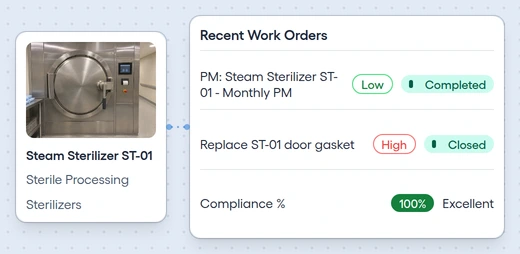
Open a surveyor-selected device's PM and repair history, photos, documents, and signed reports.
 See how it works
Facilities management
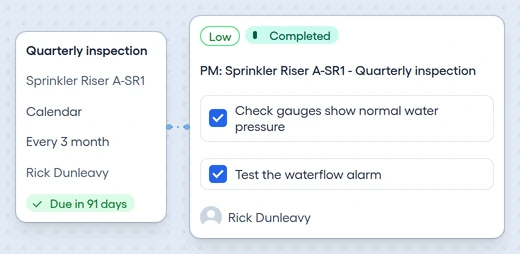
Schedule life-safety inspections, coordinate vendor visits, and keep signed reports ready for the fire marshal.
 See how it works
Hospitality
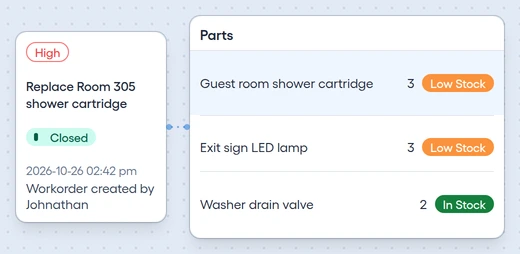
Housekeeping and the front desk send room repairs to engineering, with priority, history, and room parts on hand.
Questions teams ask before they start
Does it work on my team's phones?
Yes. Technicians install the Android app from Google Play for the whole job, photos included. In any phone's browser, app.fixahead.com fits the screen, and they can open an assigned work order, tick its tasks, and complete it.
What if there's no signal at the job?
The Android app keeps the work, photos included, and syncs it once the connection is back. The web app needs a connection.
Can I bring my spreadsheet?
Yes. Fill the asset or procedure template and import it. You see each row's errors before anything is imported.
Will a sales rep call me after I sign up?
No. Start free and look around on your own.
Free plan, then $99 a month
$99 a month, or $66 billed yearly, covers 10 users with unlimited assets, or 100 assets with unlimited users. Past that, you add $10 a month for each extra user or each 10 extra assets, $7 billed yearly, and pay the lower total. Parts tracking and procedures with photo proof are on the paid plan, whose 14-day trial takes a card.