
CMMS preventive maintenance that arrives before it's due
Set each PM by calendar or hour meter, and its work order arrives with the lead time you choose.
- Free plan, no card.

Trigger each PM by date, hours, or both
Choose daily, weekly, monthly, or yearly, or a set number of running hours, such as every 500. Pick Either, and whichever comes first makes the work order.
See what reactive repairs cost against planned PMs
Put many assets on one schedule by tag
Tag a group of assets and assign them to a schedule in bulk. A new asset with that tag picks up the schedule.

Get each PM done and on record
Each PM's work order carries its checklist to the technician's phone, and each asset shows its PM compliance.
The checklist comes with it
Link a procedure to a schedule, and each work order carries its tasks.
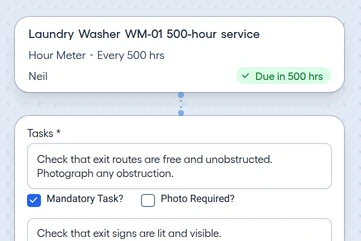
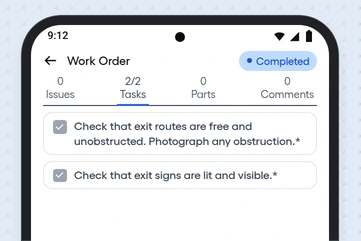
On the phone, at the job
Technicians follow the checklist on Android and add photos. With no signal, the work syncs once the connection's back.
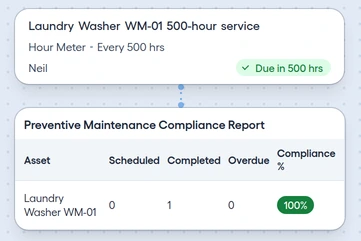
Compliance for each asset
See each asset's scheduled, completed, and overdue PMs, with its compliance percentage.


See what's coming, who does it, and when it was done
Read the PMs coming due in one forecast, matched to technicians by skill, with an alert for each overdue task.
PM Forecast
List the PMs coming due over the next 90 or 365 days, each marked Hour Meter or Calendar.
Parts on the schedule
Attach the parts a PM needs to its schedule.
Date of each PM
Every completed PM shows when it was done, on its work order.
Skill matching
Set the skills a PM needs, from 9 skill types, and FixAhead suggests the technicians who have them.
Escalation
Get an alert for each overdue task, with escalation.