
Legacy CMMS to FixAhead, migrated for free
Fill the asset template with your old system's asset list, or our support team loads it for you.
- Free plan, no card. Or book a demo.
When a legacy CMMS still makes sense
Your current system may still be right if you have deep ERP integrations or large compliance records you can't move. The same goes for rules tied to one vendor's templates.
A legacy CMMS beside FixAhead
| FixAhead | Legacy CMMS | |
|---|---|---|
| Hosting | Web app, nothing to install | Often installed and run on site |
| Modern, intuitive interface | Designed for maintenance teams, not IT departments | Varies by product |
| Reporting an issue | QR code, no account | Often a login |
| Phone | Android app, with or without signal | Varies by product |
| Free plan | 2 users or 50 assets | Rarely |
| Push notifications | On each assignment | Varies by product |
| PMs | Calendar or hour meter, pre-built templates | Yes |
| Work orders | Guided wizard | Yes |
| Assets | Location tree, any depth | Yes |
| Parts and inventory | Stock and reorder alerts | Yes |
| Reports | 11 report types | Yes |
| Custom fields | 9 types per category | Yes |
Give every technician their own login
When you pay by assets, users have no limit, so nobody shares one login for PMs.
How to get your maintenance team to use the CMMS
Make a work order in one guided wizard
Enter its name, due date, asset, and issue first, then its technician and procedure.
See work orders
Open it in a browser, nothing to install
Create your account, import your assets from the template, and set up your PM schedules.

Anyone can report a problem, with no login
Tenants, guests, and floor workers scan a QR code. You triage on a Kanban board.
See issue tracking
See all of an asset on one page
Each asset holds its QR code, documents, custom fields, and maintenance history.
See asset management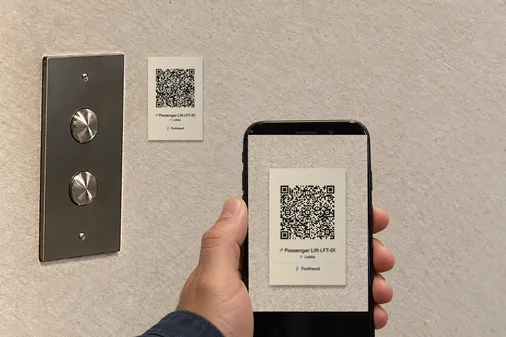
Read MTBF, MTTR, and PM compliance on reports
Export each of the 11 report types to PDF, Excel, or CSV.
See the reports
Work orders on the phone, at the job
Technicians complete them on Android, and work done with no signal syncs once the connection's back.
See the Android app
Move your assets from your legacy CMMS
Upload a CSV or Excel file up to 10 MB, and you see each row's errors before anything loads.
- Match your file to the asset template's columns
- Create the locations and categories it names
- Upload it, and fix any flagged row
- See what FixAhead connects to

Questions about leaving an older CMMS
What about regulatory compliance?
Each asset keeps its maintenance history, and each work order its timeline, with the technician and each date and time. Custom fields and procedures can record what a requirement asks for.
Can I bring my history?
The import loads assets and procedures. Check what your old system's export holds, and keep that file.
What if FixAhead is missing a feature I need?
Contact us. We ship fast and prioritize features based on customer needs. Many features in FixAhead today were requested by early adopters and shipped within weeks.
Compare another kind of tool
- Open the comparison
vs spreadsheets
Keep your sheet's columns: the asset template imports them, and PMs arrive as work orders before they're due.
- Open the comparison
vs enterprise suites
One plan with its price on the page, for teams that don't need a suite.